


Motion Capture Week 11 - Editing and Sound

Updated: Oct 17, 2023
Rounding off the project, this week's focus was on editing the pre vis sequence together and adding sound effects to make it really come to life.
As I saved each of my scene files last week, I would playblast them. Playblasting is when Maya creates a quick preview video of your scene that doesn't require the time it takes for a proper render with lighting and everything. As this project is only a pre-visualisation, playblasting is all that's required for each shot.
Here is a playblast of one of my shots, Shot 13: Street Pan:
In our lecture, we learnt about good editing techniques including cutting on action (when you cut a shot in the middle of an action and it plays out in the next shot so the movement flows continuously) and the popular 'close up to p.o.v. to reaction' shot sequence.
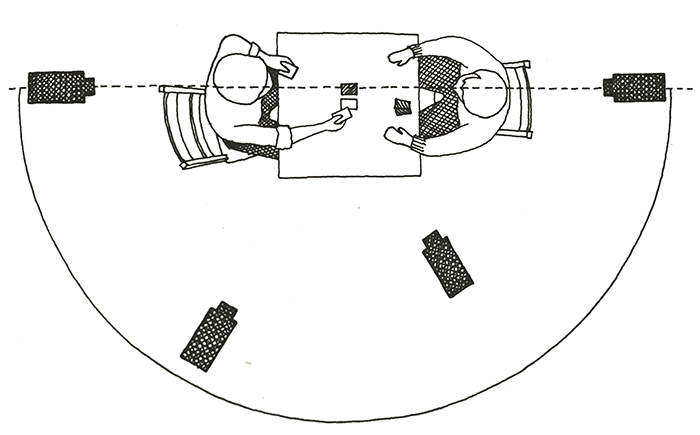
Another rule was the 180 degree rule which is mostly used in conversation scenes between two characters, but didn't apply as much to the Mecha Attack scene.
The rule states that the camera should not cross the imaginary line boundary when filming a conversation to 'maintain coherent screen direction'.
In Premiere Pro, I accumulated all of my playblasts and edited them together to make one final movie-like sequence.

When I was satisfied with the timing and editing of my sequence, I added sound effects. The sounds were sourced from websites such as Freesound.org, Pixabay.com and Freesoundslibrary.com.
Here is that same scene from before with sound:
Everything's really coming together now!!
Next week is my last update for Mocap until next year so I hope you enjoy :)


Comments